Overview
This short chapter introduces the four main components of the Jupyter ecosystem: Jupyter Notebook, Jupyter Kernels, JupyterLab, and JupyterHub. We then give a basic orientation to the two ways we can execture Python code in a Jupyter session: local and remote.
Prerequisites
| Concepts | Importance | Notes |
|---|---|---|
| Installing and Running Python: Python in Jupyter | Helpful |
The four key components
Jupyter notebooks
Tbe Jupyter Notebook Thomas et al., 2016 is an open-source format for computational narrative documents (*.ipynb files). Jupyter Notebooks contain executable code, LaTeX equations, visualizations (e.g., plots, pictures), and narrative text. The code is not limited to just Python, other languages such as Julia or R are supported as well.
Jupyter Notebooks are celebrated for their interactive output that allows movement between code, code output, explanations, and more code - similar to how scientists think and solve problems. Jupyter Notebooks can be thought of as a living, runnable publication and make for a great presentation platform.
Jupyter kernels
Software engines and their environments (e.g., conda environments) that execute the code contained in Jupyter Notebooks.
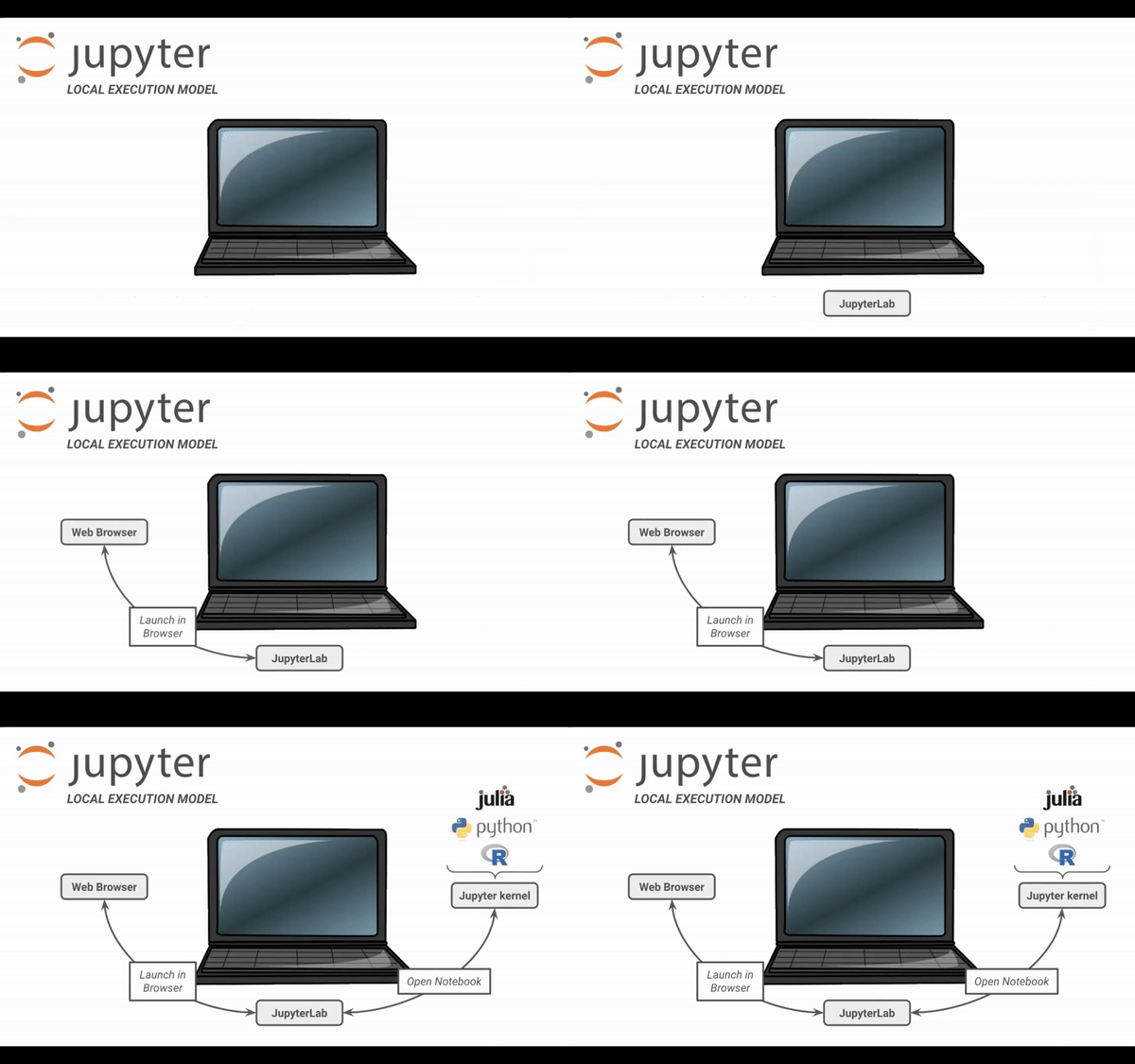
The kernel is where your Python code is interpreted and the outputs are generated, which may be either on your local computer or a remote host (see below).
JupyterLab
A popular web application on which users can create and execute Jupyter Notebook files, as well as explore data, install software, etc. See the next section for more guidance on getting started with JupyterLab
JupyterHub
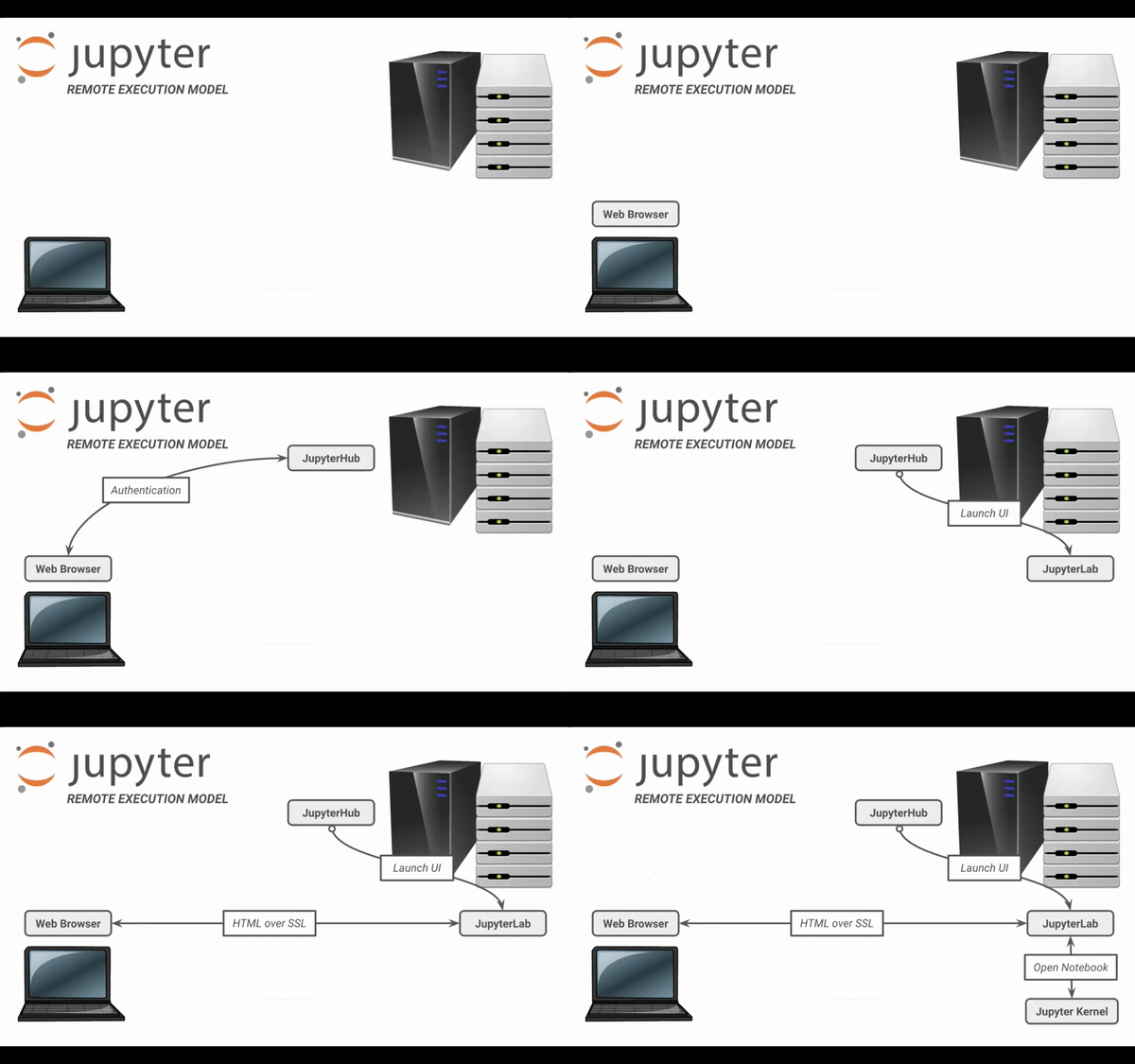
A web-based platform that authenticates users and launches JupyterLab applications for users on remote systems.
Executing Jupyter
Local execution model
You can launch JupyterLab from a terminal; it will open up in a web browser. The application will then be running in that web browser. When you open a notebook, Jupyter opens a kernel which can be tied to a specific coding language.
To launch the JupyterLab interface in your browser, follow the instructions in Installing and Running Python: Python in Jupyter.
Remote execution model
In the remote execution model, you start out in the browser, then navigate to a specific URL that points to a JupyterHub. On JupyterHub, you authenticate on the remote system, and then JupyterLab is launched and redirected back to your browser. The interface appears the same as if you were running Jupyter locally.
Summary
Jupyter consists of four main components:
Jupyter Notebooks (the
*.ipynbfiles),Jupyter Kernels (the work environment),
JupyterLab (a popular web application and interface creating and running notebooks),
JupyterHub (an application and launcher for remote execution).
We interact with JupyterLab through a web browser and the interface is the same whether we are running a local JupyterLab session or logged in to a remote session via JupyterHub.
What’s next?
Additional resources
- Thomas, K., Benjamin, R.-K., Fernando, P., Brian, G., Matthias, B., Jonathan, F., Kyle, K., Jessica, H., Jason, G., Sylvain, C., Paul, I., Damián, A., Safia, A., Carol, W., & Team, J. D. (2016). Jupyter Notebooks – a publishing format for reproducible computational workflows. In Positioning and Power in Academic Publishing: Players, Agents and Agendas. IOS Press. 10.3233/978-1-61499-649-1-87